 MeeTube
Guide
The Liquid Glass Interface, Explained
How the MeeTube liquid glass interface works, what YouTube mode changes, and how to tune the theme, icon, tabs, and Home layout.
By Santiago Vargas, Video App Reviewer and APK Tester
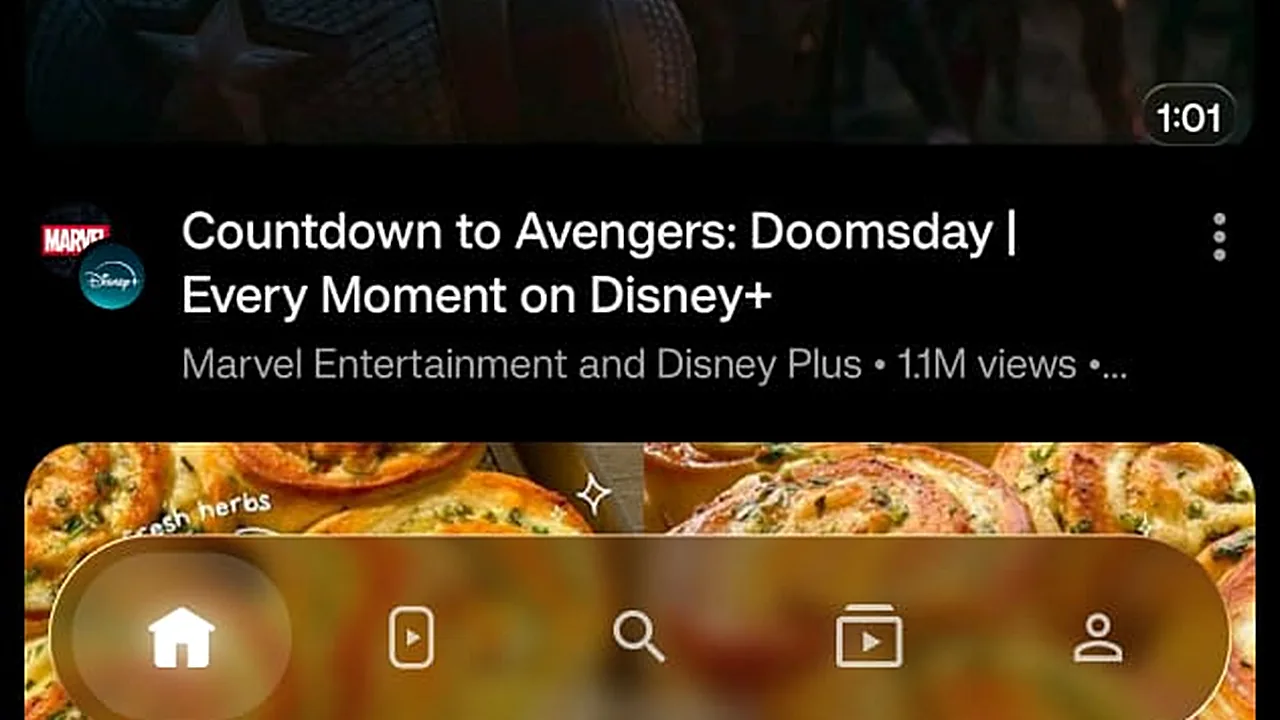
How the Glass Look Works
The liquid glass interface is the frosted design that covers the tab bar, the player buttons, and the Shorts controls in MeeTube APK. Panels bend light like glass, and a glow follows the tab you are on, so the app always shows where you are. Videos on Home start playing as you scroll, which makes the feed feel alive before you tap anything.
Glass is more than decoration. The frosted panels keep controls readable over bright video, and the glow under the active tab replaces the small indicators other apps use. The design stays consistent across Home, the player, and Shorts, so the app reads as one place rather than three different screens stitched together.
YouTube Mode: The Familiar Layout
If the glass look is not for you, YouTube mode switches to the familiar layout: a flat bar docked at the bottom and Search up top. Nothing about the content changes: the same Home feed, the same player, and the same subscriptions, in the arrangement viewers already know. The same glass treatment carries into the Shorts player, where the like, comment, and share buttons float over the video in the MeeTube Shorts player guide.
YouTube mode is worth trying if the glass panels ever feel busy on a small screen, or if you share the phone with someone who prefers the standard look. Switching is instant, and switching back is just as quick, so there is no cost to comparing the two.
Tuning the Look to Your Taste
One settings page gathers the look controls: theme between light and dark, app icon, glass effect, Home layout, tabs, and the video menu. Change one thing at a time and use the app for a day before changing another, so you can tell which change actually helped. Sound controls sit in the same glass player menu, covered in the guide to MeeTube equalizer and sound settings.
The most useful combination for most viewers is the glass interface with the tabs trimmed to the sections actually used. Fewer tabs means less clutter and a faster trip to Subscriptions, which is where daily watching usually starts.
Frequently Asked Questions
Answers to the questions readers ask before downloading MeeTube.
Can I turn off the glass effect?
Yes. The look settings include the glass effect itself, and YouTube mode replaces the glass layout with the familiar flat bar and top Search arrangement.
Does the glass interface slow down old phones?
The glass panels and the glow add rendering work, so very old phones may feel it most on the Home feed. YouTube mode and a simpler Home layout are the two settings to try first.
Do videos autoplay on Home?
Yes, videos on Home start playing as you scroll. If that uses too much data, check the autoplay and quality settings before you change anything else.