 MeeTube
MeeTube is an open-source YouTube and YouTube Music client in one app: a liquid glass interface, no video ads, background play, synced lyrics, and downloads up to 4K on Android phones.
In this guide
01The PlayerFront and centre 02MeeTuneThe music side 03Downloads in 4KSmart and automatic 04Picking the Right APK Variantarm64, armv7, universal, x86The download page holds the MeeTube APK file: choose the build for your phone after the countdown.
APK Details
| App name | MeeTube |
|---|---|
| Version | 3.6.1 |
| File size | 45.99 MB (universal); 34.31 MB (arm64-v8a); 32.38 MB (armeabi-v7a); 34.71 MB (x86) |
| Developer | yashoncode |
| Package name | io.yash.meetube |
| Category | Video Players & Editors |
| Requires Android | Android 7.0 or later |
| License | GPLv3 |
| APK variants | arm64-v8a, armeabi-v7a, universal, x86 |
| Price | Free |
Contents
- What MeeTube Is
- The Player, Front and Centre
- MeeTune: The Music Side
- Downloads in 4K, Smart and Automatic
- Glass, or the Look You Know
- Search, Channels, and Shorts
- The Refinement Release
- Picking the Right APK Variant
- How to Download and Install MeeTube
- App Screenshots
- Troubleshooting MeeTube
- Pros and Cons
- Safety and Verification
- Final Words
What MeeTube Is
MeeTube is an open-source YouTube and YouTube Music client for Android phones that puts videos and music in one app. Videos live on the MeeTube side, music lives on the MeeTune side, and one tap on the logo switches between them. The interface is a frosted liquid glass design: the tab bar, the player buttons, and the Shorts controls bend light like glass, with a glow that follows the tab you are on.
What makes MeeTube worth a look is how completely it covers daily watching. There are no video ads and no sponsor segments to sit through, videos keep playing when you lock the screen or switch apps, and downloads go up to 4K with smart and automatic options. Synced lyrics follow music videos line by line, an equalizer sits in the player menu, and a separate TV build carries the same glass design to Android TV and Google TV. You can sign in with a code to keep your subscriptions and history, or use MeeTube without an account at all.
The Player, Front and Centre
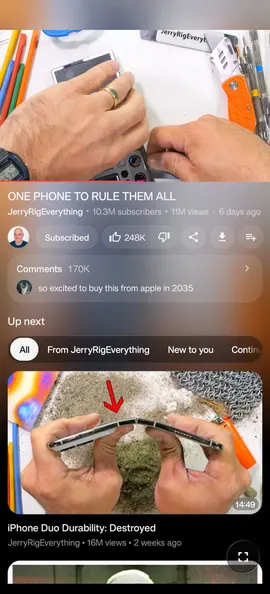
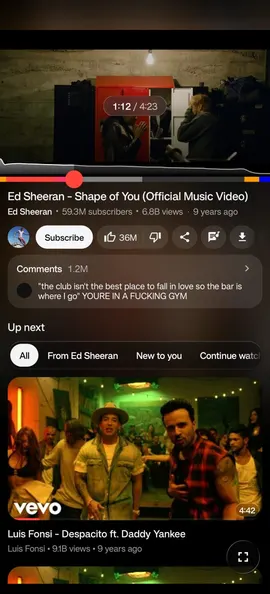
The compact watch page puts the actions beside Subscribe and the top comments right under the video, so the things you reach for most are never a scroll away. A Most replayed graph rises over the seek bar, and seeking shows the real frame, so you can jump to the part everyone rewatched instead of guessing. On a live stream, live chat sits under the video, or beside it in fullscreen, and you can chat as any of your accounts.
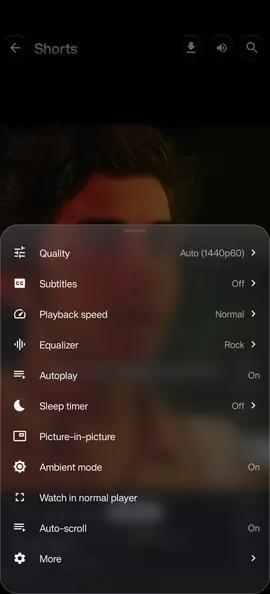
The player menu carries the controls that matter during a long video: quality with a force quality switch that holds the quality you picked instead of dropping with the connection, subtitles, playback speed, the equalizer with presets or your own bands applied live, original audio, volume up to 200 percent, autoplay, a sleep timer, picture-in-picture, and ambient mode. Brightness and volume swipes each have their own switch, and the Up next pill stays see-through so the ambient glow shows around it.
MeeTune: The Music Side
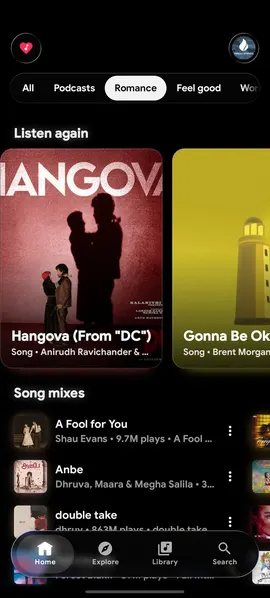
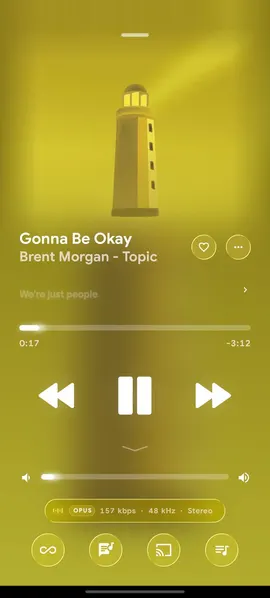
Tap the logo on Home and MeeTube turns into MeeTune, a full music app built on YouTube Music. You get the Home, Explore, Library, and Search sections, with albums, artists, playlists, moods, and your liked songs, plus a real music player with synced lyrics, a moving cover, the song format shown on a glass pill, and a radio that keeps songs coming.
MeeTune is still in beta, and its two headline features show where it is heading. AI Karaoke removes the vocals from any song right on your phone, so you can sing along, and nothing is uploaded to do it: the karaoke model is a one-time 39 MB download the app fetches itself when you turn karaoke on. MeeTuneMix flows songs into each other like a DJ set: the ending song fades out where its music ends and the next one fades in, with no volume jumps or cut vocals. Sound can be shaped further with spatial sound built on a real head model, a Cinema level with deeper bass, headphone correction, and crossfade between songs, and songs can play in the car through Android Auto. Music keeps its own History, Downloads, and equalizer, apart from your videos.
Downloads in 4K, Smart and Automatic
MeeTube saves videos up to 4K in any folder you pick. Smart downloads remember your quality, so one tap saves with the settings you already chose. Turn on auto download and new uploads from the channels and playlists you choose download on their own, so a fresh video is already on your phone when you open the app.
Downloads with lyrics play offline with the lines intact, and cached songs play with no network at all, which makes MeeTube a strong travel companion: save a playlist at home on Wi-Fi, then watch and listen on a plane, a train, or anywhere the signal drops. The Downloads section keeps everything in one place, and the You page gathers Downloads, Watch later, liked videos, and playlists together. A download-on-Wi-Fi-only switch keeps mobile data out of it, pausing a running download and resuming it on Wi-Fi.
Glass, or the Look You Know
The glass interface is the first thing you notice. Frosted panels sit over the video, the navigation bar glows under the active tab, and videos on Home start playing as you scroll, so the feed feels alive before you tap anything. It is a deliberate design choice: the app wants watching to feel calm and modern rather than crowded.
If the glass look is not for you, YouTube mode switches to the familiar layout: a flat bar docked at the bottom and Search up top. Either way, the same page lets you change the theme between light and dark, the app icon, the glass effect, the Home layout, the tabs, and the video menu, so the app can be tuned to the way you watch without digging through scattered settings. The project calls the glass look its signature, and the showcase in the project readme walks the same seven cards: watch, synced lyrics, Home, channels, YouTube mode, equalizer, and offline.
Search, Channels, and Shorts
No ads, no sponsors
Video ads are gone, and SponsorBlock skips sponsor segments, intros, and subscribe reminders inside videos.
Dislikes are back
Return YouTube Dislike shows the real dislike count, and DeArrow swaps clickbait titles and thumbnails for plainer ones.
Background play and picture-in-picture
Lock the screen or switch apps and playback keeps going, with picture-in-picture for videos and Shorts.
Shorts done right
A clean fullscreen Shorts player with glass like, comment, and share buttons, and the same background play as long videos.
Search and subscriptions
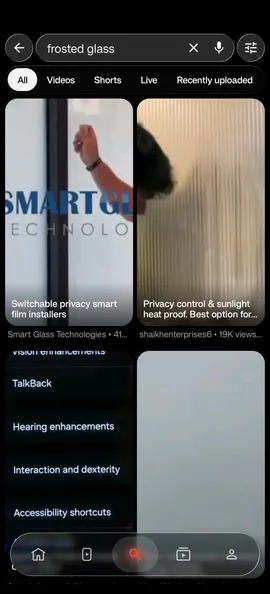
One-tap chips for Videos, Shorts, Live, and Recently uploaded, plus the full filter dialog, and your channels in a row on Subscriptions.
Channels, posts, and live chat
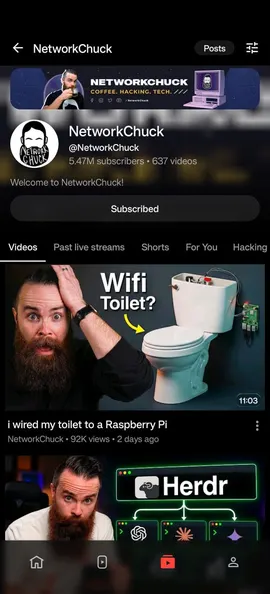
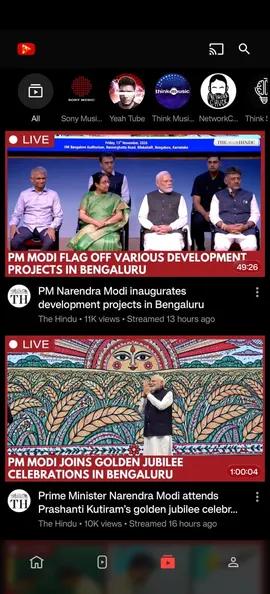
Full channel pages with banner and tabs, community posts you can like and reply to, and live chat during streams.
Synced lyrics and an equalizer
Music videos get live, line-by-line lyrics from the provider you pick, and the equalizer tunes sound live in the player.
Speaks your language
English, Spanish, Polish, Brazilian Portuguese, Romanian, Russian, Simplified and Traditional Chinese, Arabic, Turkish, and Vietnamese.
The Refinement Release
The latest release is a refinement release: it polishes the player, the music side, and the settings that viewers touch every day. Force quality arrives as a new switch on Video quality, on by default, holding the quality you picked or the highest the video has under it. MeeTune flows song to song, with fades when you skip, pause, or play, a switch to turn off loudness normalization, and fixes for distortion on loud peaks and clicks when Automix changes volume.
Watch history gets a real pause: the Do not save option now adds nothing, signed in or out, while a second option pauses history and keeps the old list visible. A new Channel notifications switch mutes every channel in one tap and keeps each channel bell for later. Brightness and volume swipes each get their own switch in the player settings. Release notes now arrive translated into every language the app has, settings arrive in Turkish, and Vietnamese is complete. The project is now licensed under GPLv3.
Picking the Right APK Variant
MeeTube ships one build per processor type, plus a universal build that works on all of them. The arm64-v8a build suits most phones sold in the last several years and is the one most viewers should pick. The armeabi-v7a build is for older or 32-bit phones, and the x86 build is for the small number of phones and emulators on that architecture. File sizes differ by variant: the universal build is 45.99 MB, the arm64-v8a build is 34.31 MB, the armeabi-v7a build is 32.38 MB, and the x86 build is 34.71 MB. The universal build is the largest because it carries every architecture in one file.
TV is a separate app. Televisions use MeeTube TV, with its own glass Home, glass player, and glowing search, built for Android TV, Google TV, and Fire TV. It installs as its own app and updates itself, so phone and TV setups stay independent. If you only watch on a phone, the phone build is all you need.
How to Download and Install MeeTube
Installing MeeTube takes a few minutes and follows the same path as any app installed outside a store. Pick the APK variant that matches your phone, open the downloaded file, and approve the install when Android asks. The steps below are written for a first install on a phone that has never installed MeeTube before.
- Choose the variant for your phone: arm64-v8a for most modern phones, armeabi-v7a for older 32-bit phones, or the universal build if you are unsure.
- Open the downloaded APK file from your browser or file manager. Android will ask you to allow installs from that app the first time; allow it just for that source.
- Tap Install, wait for the install to finish, then open MeeTube. Grant only the permissions the app asks for as you use each feature, such as storage access when you save your first download.
- Sign in with a code if you want your subscriptions and history, or skip signing in and watch without an account. Pick your quality and download folder in Settings before your first download.
- If Android blocks the install, check that the variant matches your phone and that you allowed installs from the app you opened the file with. MeeTube keeps its own app identity, so it installs beside other video apps instead of replacing them.
App Screenshots
These screenshots come from the project itself and show the app as it looks on a phone: the channel page, the compact player, the equalizer, the MeeTune home and player, the Most replayed graph, search, and subscriptions. Swipe sideways to see them all.
Troubleshooting MeeTube
Most MeeTube problems come down to three causes: the wrong variant, a permission that was never granted, or a setting that changed in an update. Work through the checks below in order, and test after each one instead of changing several things at once.
Install blocked or App not installed. Confirm the variant matches your phone, allow installs from the app you opened the file with, and make sure there is free storage. If an older build refuses to update, uninstall it first and install the new build cleanly, then sign in again.
Quality keeps dropping. Open Video quality in the player and turn on the force quality switch, which holds the quality you picked. On a weak connection, lower the quality one step instead: a steady lower quality beats a higher one that keeps buffering.
Downloads do not start. Check the download folder in Settings and confirm storage permission is granted. Free up space if the phone is nearly full, and check that smart downloads remembered the quality you expect.
Lyrics do not appear. Lyrics come from the provider you pick in settings, and they only show on music videos that carry them. Try another provider, then check the song again.
Sign-in code trouble. Enter the code exactly as shown, on the device MeeTube asks for. If signing in keeps failing, use MeeTube without an account while you try again later: watching, downloads, and playlists work either way.
Pros and Cons
Pros
- One app for videos and music, with a music side that has its own history, downloads, and equalizer
- No video ads, sponsor skipping, real dislike counts, and plainer titles and thumbnails
- Background play, picture-in-picture, 4K downloads with smart and automatic options, and synced lyrics
- Works without an account, installs beside other video apps, and is built and signed in public from open source
Cons
- MeeTune is in beta, so the music side is still growing with every release
- No Play Store listing, so updates mean installing a new build by hand
- Some features, like AI Karaoke, need extra downloads the first time you turn them on
- The glass interface is heavier than a plain one, so very old phones may feel it most on the Home feed
Safety and Verification
Every release of MeeTube is built and signed in public by automated workflows from the project source, so the build steps for each APK can be inspected. That public build trail is the strongest check a viewer has: the file you install is the file the project published, with no repackaging step in between. The project changelog for each release lists what changed, what was fixed, and which community reports shaped it.
This site checks every feature claim against the app itself before it is published, tests install and playback on real Android phones, and says plainly when a listing or release note is silent instead of filling the gap with a guess. AI Karaoke runs on the phone, and nothing is uploaded to remove vocals. If a claim on this page ever stops matching the app, the page is corrected, and the correction starts with the APK details table at the top.
Frequently Asked Questions
Answers to the questions readers ask before downloading MeeTube.
Is MeeTube free?
MeeTube is an open-source project licensed under GPLv3, and the app itself carries no video ads. The APK details table lists the price as free.
Do I need an account to use MeeTube?
No. You can sign in with a code to keep subscriptions and history, or use MeeTube without an account at all. Watching, downloads, and playlists work either way.
Can MeeTube download videos?
Yes, up to 4K, in any folder you pick, with smart downloads that remember your quality and auto downloads for the channels and playlists you choose.
Does MeeTube work on a TV?
MeeTube TV is a separate app for Android TV, Google TV, and Fire TV, with its own glass Home and player. It installs and updates itself, apart from the phone build.
Which Android version does MeeTube need?
The project readme states Android 7.0 or later.
Does MeeTube have ads?
No video ads, and SponsorBlock skips sponsor segments, intros, and subscribe reminders inside videos.
Can I keep my watch history paused?
Yes. The latest release gives watch history a real pause: Do not save adds nothing, signed in or out, and a second option pauses history while keeping the old list visible.
What is MeeTune?
MeeTune is the music side of MeeTube, one tap on the logo away, built on YouTube Music with synced lyrics, AI Karaoke, MeeTuneMix, and its own history, downloads, and equalizer. It is still in beta.
Final Words
MeeTube is the video client for viewers who want one app to do the whole job: a calm glass interface, music with lyrics and karaoke on the side, playback that keeps going when the screen locks, and downloads that are ready before a trip. The beta music side and the hand-installed updates are the honest trade-offs, and both are stated plainly above. Pick the variant that matches your phone, start with the arm64-v8a build if you are unsure, and let the player, not the settings, do the talking on your first evening.